Oracubes Technologies — ERP Software Company in Sialkot, Pakistan since 2003. Proprietary ERP products CONIAC, AUGER, SQUID, EAGLE EYE 7, SMART SHOP, SMART RESTAURANT & BANQUET MANAGEMENT, plus Odoo implementation, web design, app development & IT consultancy.
ORACUBES
360 SOLUTION COMPANY
ERP · WEB · APP · CONSULTANCY
A Leading ERP Solution Provider — Sialkot, Pakistan
SCROLL
Odoo Apps
Build an ERP to meet yourgrowth goals
We Build Digital Solutions That Scale
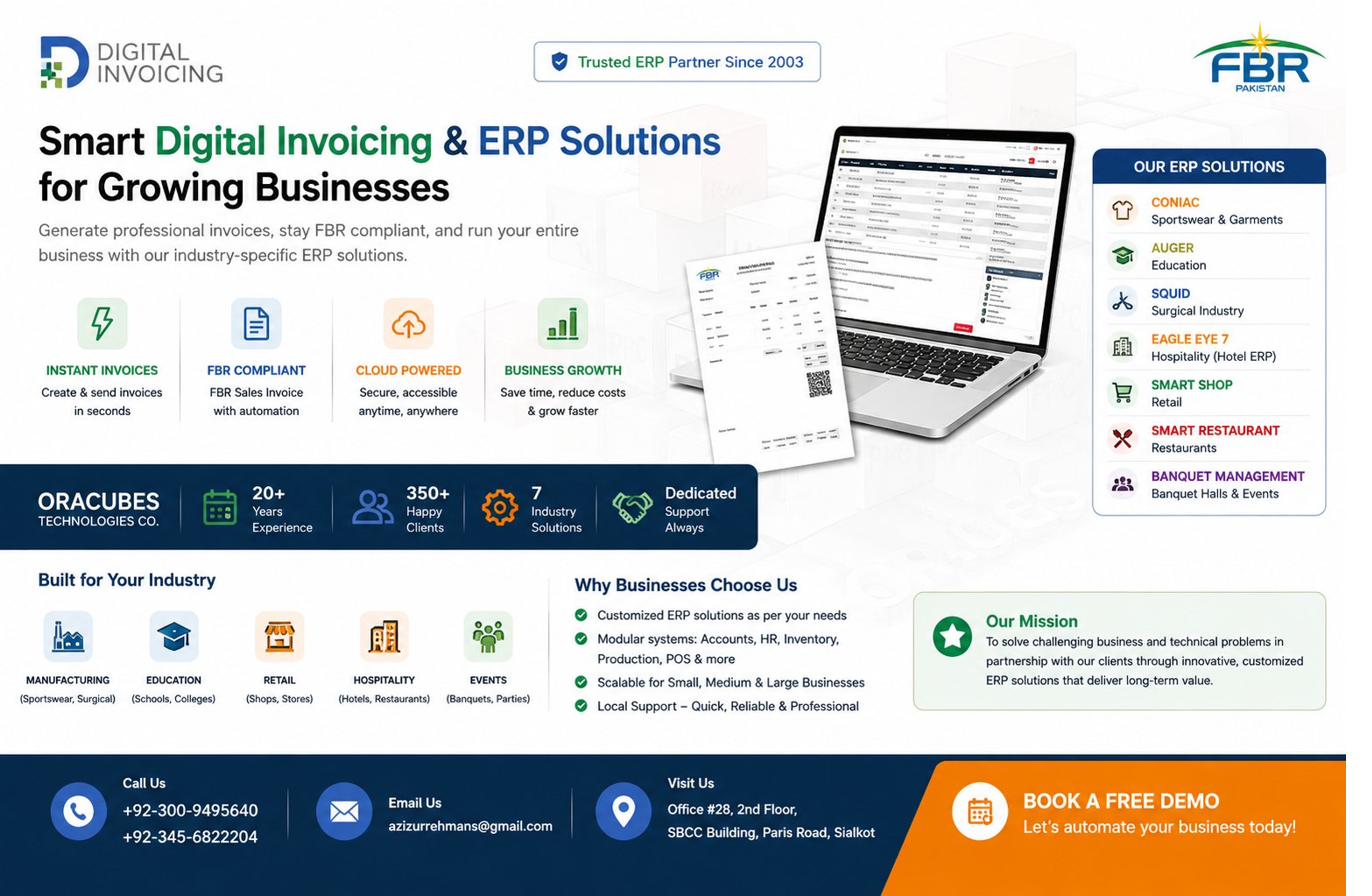
Since 2003, Oracubes Technologies has built 7 proprietary ERP products — CONIAC (sportswear & garments), AUGER (education), SQUID (surgical), EAGLE EYE 7 (hotels), SMART SHOP (retail), SMART RESTAURANT and BANQUET MANAGEMENT — alongside Odoo ERP implementation, web design, app development and IT consultancy for businesses across Pakistan and beyond.
ERP Software
Web Design
App Development
Consultancy
Odoo ERP
Digital Solutions
Mobile Apps
Sialkot Pakistan
ERP Software
Web Design
App Development
Consultancy
Odoo ERP
Digital Solutions
Mobile Apps
Sialkot Pakistan
What We Do
Our Core Services
End-to-end technology solutions crafted specifically for your business needs.
🌐
Web Design
Stunning, fast, SEO-optimised websites that convert visitors into customers. Built with modern frameworks.
UI/UXWordPressReact
📱
App Development
Native and cross-platform iOS & Android apps that deliver seamless experiences and real business results.
FlutterReact NativeiOS/Android
⚙️
E.R.P. Software
Complete Odoo ERP implementation — accounting, inventory, HR, sales and operations in one powerful system.
OdooAccountingInventory
💡
Consultancy
Strategic IT consulting helping you choose the right technologies and achieve measurable digital transformation.
Oracubes Technologies is an ERP software company founded in 2003 in Sialkot, Pakistan. We build 7 proprietary ERP products for specific industries and also provide Odoo ERP implementation, web design, mobile app development and IT consultancy.
Oracubes Technologies was founded in 2003 by Aziz ur Rehman, our CEO, who has more than 25 years of programming and management experience across textiles, surgical manufacturing and software development.
What modules does Oracubes ERP include?
+
Our ERP is modular: Accounts, HR & Attendance, Store & Inventory, Procurement, Production (PPC), Point of Sale, Export & Shipment, and Administration. You switch on the modules your business needs.
Where is Oracubes Technologies located?
+
We are based at Office No.28, Second Floor, SBCC Building, Chamber of Commerce, Sialkot, Punjab, Pakistan, and serve clients locally and worldwide.
What industries does Oracubes serve?
+
Our dedicated ERP products cover sportswear & garments, education, surgical, retail, hotels & hospitality, restaurants and event venues. We also serve logistics, wholesale, eCommerce, travel, healthcare, trading, construction and manpower supply.
Can you integrate Odoo with Shopify or WooCommerce?
+
Yes. We integrate Odoo and our ERP products with Shopify, WooCommerce, Amazon, Microsoft, Salesforce, SAP and many other platforms, including ZATCA e-invoicing.
How do I get started?
+
Contact us via the form, call or WhatsApp +92 345 6822204, or call +92 300 9495640. We will schedule a free consultation to understand your needs and propose a solution.
Our Services
Our Services
End-to-end technology solutions tailored to your business — from ERP to mobile apps.
01 — Web Design
Modern Websites That Convert
We design and build fast, beautiful, SEO-optimised websites that represent your brand and drive real results.
🎨
UI/UX Design
User-centered design that looks stunning and delivers intuitive, engaging experiences across all devices.
💻
Custom Web Development
Fully custom websites built with React, Next.js, or WordPress — tailored exactly to your business needs.
🛒
eCommerce Websites
Full-featured online stores with payment integration, inventory management and order tracking.
⚡
Speed & SEO Optimization
Google-ready websites with fast load times, clean code and proper SEO structure built in from day one.
02 — App Development
Mobile Apps Built to Perform
Native and cross-platform mobile applications for iOS and Android that users love.
📱
iOS App Development
High-performance native iOS apps built with Swift — optimized for iPhone and iPad.
🤖
Android App Development
Feature-rich native Android apps using Kotlin and Java for the full Android ecosystem.
🔄
Cross-Platform (Flutter)
One codebase, two platforms. Flutter apps that feel truly native on both iOS and Android.
🔗
API & Backend Integration
Seamless integration with your existing ERP, CRM or third-party services for a connected experience.
03 — ERP Software
Odoo ERP — All-in-One Business System
Complete Odoo implementation, customization and ongoing support — streamline every function of your business.
💰
Accounting & Finance
Automate invoicing, expense tracking, bank reconciliation and financial reporting with Odoo Accounting.
InvoicingExpensesReporting
📦
Inventory Management
Real-time stock tracking, warehouse management, automated reordering and multi-location support.
StockWarehousePurchase
👥
HR & Payroll
Employee management, recruitment, leave tracking, payroll processing and attendance management.
EmployeesPayrollRecruitment
📊
CRM & Sales
Manage your entire sales pipeline, track leads, automate follow-ups and close deals faster.
CRMSalesPOS
🏭
Manufacturing
Production planning, bill of materials, work orders, quality control and shop floor management.
MRPPLMQuality
🎯
Marketing Automation
Email marketing, SMS campaigns, social media marketing and marketing analytics all in one platform.
EmailSMSSocial
04 — Consultancy
Strategic IT Advisory
We help businesses make the right technology decisions — saving time, money and resources.
🗺️
IT Strategy & Roadmap
Define a clear digital transformation roadmap aligned with your business goals and budget.
🔍
ERP Health Check
Audit your existing ERP system, identify bottlenecks and get a clear plan for optimization.
👨💼
Functional Consulting
Our functional experts map your business processes to the right Odoo modules and workflows.
🤝
Partner & Referral Program
Join our partner program and earn commissions while helping businesses in your network adopt Odoo ERP.
05 — Chatbot Development
Intelligent Chatbots That Convert
We build smart website and WhatsApp chatbots that act as your 24/7 digital salesperson — greeting visitors, answering questions instantly and capturing leads while you sleep.
🤖
AI-Powered Website Chatbots
Smart bots that greet visitors, answer FAQs instantly and guide users toward taking action — around the clock.
24/7AI
💬
WhatsApp & Social Chatbots
Automated conversations on WhatsApp and social media so customers get instant replies on the channels they already use.
WhatsAppSocial
🎯
Lead Capture & Qualification
Bots that qualify visitors, recommend the right products or services and hand warm leads straight to your team.
LeadsSales
⚙️
Custom Automation & Training
Fully customised business-automation chatbots integrated with your website, trained and continuously optimised for your audience.
AutomationIntegration
Ready to Get Started?
Tell us about your project and we'll get back to you within 24 hours with a free quote.
An ERP software company based in Sialkot, Pakistan — delivering world-class digital solutions since 2003.
Our Story
Built in Sialkot, Built for Growth
Oracubes Technologies was founded in 2003 by Aziz ur Rehman with a single mission: to bring world-class ERP and technology solutions to businesses in Sialkot and Pakistan at competitive prices.
Over 20+ years we built 7 proprietary ERP products — CONIAC, AUGER, SQUID, EAGLE EYE 7, SMART SHOP, SMART RESTAURANT and BANQUET MANAGEMENT — and expanded into Odoo implementation, web development and mobile applications, becoming a true one-stop technology partner.
Today, we serve 50+ clients across Pakistan and internationally, with a passionate team of developers, designers and consultants dedicated to your success.
100+
Projects Delivered
50+
Happy Clients
20+
Years Experience
10+
Team Members
Why Choose Us
Why Businesses Trust Oracubes
We combine technical excellence with real business understanding.
🏙️
Based in Sialkot
Locally based in Sialkot's Chamber of Commerce area with deep understanding of Pakistan's business landscape.
⚡
Fast Delivery
Projects delivered on schedule with clear milestones and consistent communication throughout.
🔧
Custom Solutions
No templates. Every solution built from scratch to match your exact business requirements.
🛡️
Ongoing Support
Full post-launch support, maintenance and training included on all projects.
💰
Competitive Pricing
World-class technology at Pakistan-competitive rates — maximum ROI for every investment.
🌍
Global Standards
Our work meets international quality benchmarks — serving clients across Pakistan, Middle East and Europe.
Our Team
The People Behind Oracubes
A passionate team of developers, designers, consultants and marketers committed to your success.
Leadership
CEO
Aziz ur Rehman
Founder & CEO
CTO
Chief Technical
CTO & Lead Architect
Technical Team
SR
Sr. Odoo Developer
ERP Backend
WD
Web Developer
Frontend / React
MD
Mobile Developer
Flutter / iOS / Android
UI
UI/UX Designer
Design & Prototyping
BE
Backend Engineer
APIs & Integrations
Consulting & Marketing
FC
Functional Consultant
Odoo ERP Expert
DM
Digital Marketer
SEO & Paid Ads
SM
Social Media
Content & Strategy
HR
HR Executive
People & Culture
Want to Work With Us?
Get in touch and let's discuss how we can help your business grow.
Companies across Sialkot and beyond rely on Oracubes Technologies to power their digital operations.
Client Portfolio
Brands We Work With
From manufacturers and schools to hospitals and eCommerce stores — we serve businesses across all sectors.
Testimonials
What Our Clients Say
⭐⭐⭐⭐⭐
"Oracubes implemented Odoo ERP for our manufacturing unit in record time. The team was professional, knowledgeable and always available for support."
— Client, Manufacturing Sector, Sialkot
⭐⭐⭐⭐⭐
"Our website traffic tripled after Oracubes redesigned our website and implemented their SEO strategy. Highly recommended for any business in Sialkot."
— Client, Retail Sector, Sialkot
⭐⭐⭐⭐⭐
"The mobile app they built for us is exactly what we needed. Smooth, fast and our customers love it. Great team to work with."
— Client, eCommerce, Pakistan
Join Our Growing Client Family
Let's discuss how we can deliver results for your business too.
Since 2003, Oracubes has built seven industry-specific ERP systems for businesses in Pakistan and worldwide. Every product is modular — switch on only what you need.
CONIAC
Sportswear & Garments ERP
Quick answer: CONIAC is a complete ERP for apparel and sports-goods manufacturers, covering export documentation, production planning and shipment.
Quick answer: SMART SHOP is a retail POS and ERP for medical stores, general stores, shoe shops and wholesale agencies, with accounts, inventory and HR.
We respond to all inquiries within 24 business hours. For urgent matters, WhatsApp us at +92 345 6822204 for immediate assistance.
Do you offer a free consultation?
+
Yes! We offer a free 30-minute consultation for all new clients. We'll discuss your needs and recommend the best solution for your business.
Do you work with international clients?
+
Absolutely. While headquartered in Sialkot, we serve clients across Pakistan, the Middle East, Europe and beyond. We are fully set up for remote collaboration.
What payment methods do you accept?
+
We accept bank transfers, JazzCash, EasyPaisa and PayPal for international clients. We require a 50% advance payment before starting any project.
Point fo sale — Free Trial
Quick answer: Oracubes Technologies presents a powerful and intelligent Retail Business Management Software, designed as a complete Point of Sale (POS) solution. This system is built to streamline and automate all operations of modern retail businesses, ensuring efficiency, accuracy, and real-time control over your entire workflow. Our POS solution is suitable for all types of retail businesses and includes the following comprehensive modules:
Products Management
Efficiently manage your entire inventory with advanced product handling features:
Complete product listing and categorization
Real-time tracking of zero stock and low stock items
Store trial balance for inventory monitoring
Detailed store ledger for stock movement and history
Purchase Management
Simplify your procurement process with structured purchase controls:
Supplier management and record keeping
Purchase entry and tracking
Purchase return handling with proper adjustments
Sales Management
Handle all your sales operations with speed and precision:
Customer management, including credit customers
Sales entry with billing and invoicing
Sales return management
Credit sales tracking and customer balance handling
Reporting & Analytics
Make informed decisions with powerful reporting tools:
Store ledger reports for complete stock tracking
Store trial balance reports for financial insights
Short item reports to identify low or missing stock
Multiple customizable reports for better business analysis
With Oracubes POS, you gain full control over your retail operations, reduce manual errors, and improve overall business performance through a smart, user-friendly interface.
Your website is edited visually now — open the editor and right-click anything to change it, like a document.
💡 How it works: Click 🖉 Edit Website Visually, then right-click any text, image, button or whole section to edit, replace, resize or delete it. Choosing Resize puts drag handles on all four edges and corners — just like resizing a window. Double-click text to type directly. Hit Save and the changes go live on oracubes.com for all visitors.
🚀 Quick Actions
📈 Website Overview
Menu Items
7
Services
–
Portfolio
–
Blog Posts
–
Clients
–
FAQs
–
Testimonials
–
Industries
12
📋 Visual Editor Cheat Sheet
🖱️ Right-click anything
Edit, replace image, resize with drag handles, duplicate, move or delete it
⌨️ Double-click text
Type directly in place — Enter saves, Escape cancels
➕ Add new items
Right-click inside any grid (services, FAQs, team…) → Add
💾 Save when done
Nothing goes live until you press Save in the bottom toolbar
🏢 Company Info
Update your company name, tagline and logo.
PNG with transparent background recommended. Changes apply live to the navbar, the large hero logo on the homepage, and the footer.
Square image, min 64×64px (PNG or ICO). Shows in the browser tab.
🧭 Menu Manager
Show/hide menu items and change their order. Click Save when done.
Dropdown Menus & Short Links
Edit the items inside each menu's dropdown — icon (emoji or uploaded image), title, subtitle and destination. Leave the icon empty to remove its tile. Delete all items to hide a dropdown entirely.
Flyouts: use ↳ Sub-item to turn an item into a group that opens a side menu (e.g. Portfolio → Client Portals › → one entry per client), up to 3 levels. Short links: every item whose destination is an https:// address gets a shareable link www.oracubes.com/go/… that instantly redirects there and counts clicks. Turn Show in menu off to keep a link private (shareable, but not in the navbar); turn Link active off to disable the link itself.
The Pricing ▾ dropdown is managed separately in 🏷️ Pricing Management (one pricing page with plan cards per software).
Top-right Button
🔘 Buttons & Labels
Edit the text on any button across your website — and where it links to. Changes apply everywhere instantly.
💡 Tip: type in the search box to find a button fast. Click ↺ on any row to restore its original text. WhatsApp button links here are separate from the number on the Social Links page.
✨ Hero Section
Edit the homepage rotating text and subtitle.
💊 App Pills
The Odoo-style falling pills section on the homepage. Edit the heading, then add, remove, reorder and recolor the pills.
💡 Pills fall with real physics when visitors scroll to the section — they can be dragged and thrown. Give a pill a link and visitors can double-click it (double-tap on phones) to open that page in a new tab. Section colors are in 🎨 Theme Colors → App Pills Section.
Section Content
Pills
🛠️ Services
Add, edit, or remove services shown on the home page.
💼 Portfolio Manager
Showcase your completed projects with images, descriptions and case studies.
📋 All Projects
Loading...
💼 Project Details
🏢 Industries Manager
Manage the industries/verticals shown on your Industries page.
💡 Tip: Each industry card shows an icon, title, and short description. Add new ones or edit existing entries. Changes reflect on the live Industries page instantly.
🎁 Free Trial Manager
Manage the software products shown on the Free Trial page.
💡 Tip: Each option appears as a card on the Free Trial page. Clicking it opens a detail screen showing the description, image and a Final Trial button that links to the URL you set here. Add, edit or remove products anytime — changes reflect on the live page after saving.
🏷️ Pricing Management
Each software in the Pricing ▾ menu has its own pricing page (/pricing/…) with a Monthly / Annual switch, up to 4 plan cards and an optional Build your own plan section under them.
💡 How it works: pick a Software, edit it in its tabs, press 💾 Save, check 👁 Preview, then 🚀 Publish. Until a software is published its page shows a professional “Pricing Coming Soon” message. New software starts with 🧪 sample plans — replace the sample prices before publishing. Prices:Monthly = price per month; Annual = the total for 12 months. Leave either empty if you don't offer it (both empty → the card shows its price label, e.g. “Custom”); 0 shows as “Free”. The Monthly / Annual switch and its “Save up to N%” badge appear automatically when prices have both. Pricing by students / users: add 📏 Ranges (e.g. 1–100, 101–200 students) and 🧩 Modules with a price per range. Each plan then chooses: a flat price (as before), the sum of its modules (optional bundle discount) or its own price per range. Turn on Build Your Plan Yourself (💳 Plans tab) to show the “Build your own plan” section under the plans, where visitors pick modules themselves. Visitors type their number of students/users and see the matching prices. Build your own plan: tick Always included (core) on a module (🧩 tab) to include it in every plan; add support plans (one is chosen) on the 🎧 Support tab; the pre-filled number and quick-pick buttons are on the 📏 Ranges tab. Menu: rename, hide or move the Pricing menu item itself in 🧭 Navigation / Menu. Any button or link set to /pricing/ID (shown on each software) opens that pricing page.
🌐 Pricing page settings (all software)
Use text like: Save up to 21%
The Contact Us button's label is editable in 🔘 Buttons & Labels (group “Pricing Page”).
ℹ️ About Us Page
Edit all content on the About Us page — company story, stats, team and more.
🏷️ Page Hero / Header
The large heading and description shown at the top of the About Us page.
📖 Our Story
📊 Stats / Numbers
These appear as the stats boxes on the About page.
🏆 Why Choose Us Cards
Edit the cards shown in the "Why Choose Us" section.
👥 Team Members
Manage team member cards displayed on the About page.
❓ FAQs
Add or edit frequently asked questions.
⭐ Testimonials Manager
Manage client testimonials and reviews.
📋 All Testimonials
Loading...
⭐ Testimonial Details
📞 Contact Details
Update your phone numbers, emails and office address.
Phone Numbers
Email Addresses
📬 Contact Form — Send Submissions To
Every contact form submission is emailed to these fixed addresses and saved to Leads / Submissions:
hassanaqdas@gmail.com
oracubesfahad@gmail.com
azizurrehmans@gmail.com
info@oracubes.com
Recipients are fixed inside send-mail.php on the server so the form cannot be hijacked. Changing them requires editing that file.
Office Address
🌐 Social Media Links
Connect your social media accounts.
🤝 Client Logos
Manage the client brand logos shown in your Clients section.
💡 Tip: To update your company logo, go to Company Info. Upload client logos here. Logos show grayscale by default and switch to colour on hover.
➕ Add New Client Logo
📋 Existing Client Logos
🚂 Logo Train
Customise the animated train that carries your client logos: brand the engine, set its speed, and control the gap between trains.
💡 Tip: The engine logo, speed and gap apply to the train on both the homepage and the Clients page. Set the gap to 0 for a continuous, seamless stream.
🏷️ Engine Logo
✥ drag logo on the plate
PNG with a transparent background works best. Applies live to the train engine. Upload to make the engine plate appear, then drag the logo to position it.
50%300%
⚙️ Motion
🐢 SlowFast 🐇
0s (seamless)30s
📝 Blog Manager
Write new blogs, edit existing ones, and manage your blog posts.
📋 All Blog Posts
Loading...
✏️ Edit Blog Post
🤖 Chatbot — Oracubes Assistant
The floating assistant in the site's bottom-left corner. It answers from a prebuilt knowledge base (/chatbot/knowledge.js) — no per-reply training needed.
📡 Widget Status
Engine
—
Knowledge Chunks
0
Product Cards
0
Fixed branding: accent #c8202e · position bottom-left · title Oracubes Assistant — set on the embed tag before </body>.
🧪 Test the Assistant
Ask exactly what a visitor would. You'll see the answer, its confidence score and its sources. Low-confidence tests are logged below, same as real visitor questions.
📜 Activity Log
Unanswered
0
Helpful 👍
0
Not Helpful 👎
0
Leads
0
ℹ️ The log is per-browser (localStorage) — it only shows interactions made in this browser. To collect activity from all visitors, set CONFIG.logWebhookUrl in /chatbot/js/chat-core.js (e.g. a Google Apps Script web app) later.
📚 How to update the chatbot's knowledge: edit the markdown files in data\sources\ of the source project (d:\claude code\project 9), run npm run build there, then upload the regenerated knowledge.js to /chatbot/knowledge.js. The widget reads it automatically on the next page load.
🎨 Theme Colors — Design Engine
Set the solid color of every section and component independently. Every change previews live on your site; click Save & Apply to publish it to all visitors. (The admin panel itself always stays dark.)
💡 How it works: Each control overrides one surface. Leave a control on Default to keep its built-in color, or pick a color (you can also paste any CSS color / gradient into the text box) to override it. Use ↺ to revert a single control, a whole section, or everything.
🎨 Quick Theme Presets
One click sets a complete look — brand colors plus light/dark surfaces. Fine-tune any individual surface below afterwards.
🖱️ Cursor Style
Choose a custom cursor shape for your entire website. Click a card to select and preview it instantly.
💡 Tip: Custom cursors add personality but can feel distracting on content-heavy sites. "Default" is always a safe choice. The cursor is hidden on touch devices automatically.
🎨 Cursor Color
Pick any color for your custom cursor. Defaults to your primary theme color if left blank.
👆 Cursor Shape
✨ Logo Animation
Add life to your logo in the top-left of every page. Pick a preset or load a Lottie JSON animation for fully custom effects.
💡 Tip: Subtle animations (Pulse, Float, Glow) work best for professional sites. Loud animations (Bounce, Shake) are better for landing pages & promos.
Preset Animations (CSS)
Custom Lottie Animation
Paste a Lottie JSON URL (from lottiefiles.com — use the "Lottie JSON" URL). This will replace your logo image with the animated Lottie. Leave blank to keep your logo.
💾 Backup
Download a complete backup of your website files.
📦 Complete Website Backup (ZIP)
Downloads all website files in a single ZIP — index.html, .htaccess, save-config.php and the current config. Upload the ZIP contents to your hosting to restore.
📄 Settings Only
Download just your content settings as a JSON file. Useful for copying settings to another installation.
🔑 Change Admin Password
Update your admin login password.
📥 Leads & Form Submissions
All contact form submissions from your website — manage leads in one place.
Total Leads
0
New (Unread)
0
Converted
0
✉️ Subscribers
People who subscribed via the website. Notify them of new blog posts & site updates.
Total
0
Blog Opt-in
0
Updates Opt-in
0
📣 Send a Website Update
Emails everyone subscribed to website updates or everything.
📊 Analytics Dashboard
Track visitors, page views, devices and more.
Visits
0
Daily Average
0
Previous Period
0
My Visits (Excluded)
0
📈 Visits Over Time
📄 Top Pages (All Time)
📱 Devices
🔗 Traffic Sources
Where visitors came from — search, social, campaigns (UTM) and direct.
🌍 Visitors by Region
👣 Recent Visitor Sessions
Each row is one real visitor — when they arrived, their country and device, where they landed, and how much they explored.
👣 Visitor Journeys
Each visitor's step-by-step path — every page viewed and button clicked, in order. Click a visitor to expand their full journey.
🎯 Conversion Funnels
How far visitors get toward your two key goals — starting a Free Trial and submitting the contact form (your consultation / demo request). Each step shows how many visitors reached it, and the red figure is the drop-off to the next step.
🖱️ CTA Performance
Your most-clicked buttons & links in this period — which calls-to-action actually get engagement.
🚪 Where Visitors Drop Off
The last page each visitor saw before leaving — your biggest exit points.
📌 Engagement Snapshot
How deeply visitors explore before leaving.
💡 Recommendations
Suggestions generated from the numbers above to smooth the visitor journey and lift conversions.
🙈 Exclude My Own Visits
Once you log into this panel, this browser is already excluded automatically. Add IP addresses here to also exclude visits from other devices/networks of yours — this applies retroactively to past visits too.
⚙️ Actions
🖼️ Media Library
Central storage for all your images. Upload once, use anywhere.
💡 Tip: Click any image to copy its data URL, then paste into blogs, portfolio or other sections. Bulk upload multiple images at once!
🪟 Popup Modal
Manage the popup that appears when visitors first land on your site.
⚙️ Popup Settings
How often a returning or refreshing visitor sees the popup. “Once per day” is recommended — it stays visible without nagging.
🖼️ Popup Content
Upload an image or set a URL for the popup banner. You can also add a heading, description and button link.
🔁 Returning-Visitor Variant (optional)
Shown instead of the copy above to visitors who have been to your site before. Leave every field blank to show all visitors the same popup.
👁️ Preview
Configure above, then save to see preview
Subscribe to Oracubes
Stay in the loop — tell us where to reach you. Every field is optional (add an email if you'd like to actually receive updates).